Welcome to our Canon EOS R50 Memory Card Guide where you will find all that you need to know about memory cards for the Canon R50.
Canon R50 Forum & Facebook Group
If you are looking for further help and advice on the Canon R50 or would simply like to share your photos and videos, then please head over to our friendly Forum. If you prefer Facebook then we also run the Canon R50 Shooters Group.
Supported Memory Cards
The Canon EOS R50 has just one memory card slot and this supports SD/SDHC/SDXC UHS-I memory cards.
Unfortunately UHS-II memory cards are not supported, although they will normally work just fine but only at UHS-I speeds.
Best UHS-I SD/SDHC/SDXC Memory Cards
We have not yet had the opportunity to test all of our cards in the Canon R50.
Therefore below you will find the cards that we have tested for our Canon R7 Memory Card Guide.
As soon as we have the opportunity to test the R50 the results below will be updated with in-camera results from the R50.
Swipe left on mobile to view the entire table.
| UHS-I SD Memory Card | Shots to Fill Buffer * | Buffer Clearing Time in Seconds | Video Speed Class |
|---|---|---|---|
 Delkin Devices Advantage (128 GB) B&H Photo | Amazon | 39 (30 fps) | 16.5s (30 fps) | V30 |
 Kingston Canvas Go! Plus (64 GB) B&H Photo | Amazon | 39 (30 fps) | 16.5s (30 fps) | V30 |
 SanDisk Extreme PRO (64GB) B&H Photo | Amazon | 39 (30 fps) | 17s (30 fps) | V30 |
 SanDisk Extreme (64GB) B&H Photo | Amazon | 39 (30 fps) | 21s (30 fps) | V30 |
 Lexar Professional SILVER PLUS (64GB) B&H Photo | Amazon | 39 (30 fps) | 21s (30 fps) | V30 |
What Size Memory Card Do You Need for Shooting Stills?
If you are shooting birds in flight or motorsports then you’ll be shooting lots of continuous bursts and will want a much larger memory card.
But if you shoot landscapes then you can probably get away with a much smaller card.
The table below shows how many shots you can capture on a single 32GB card depending on the file format that you are shooting in.
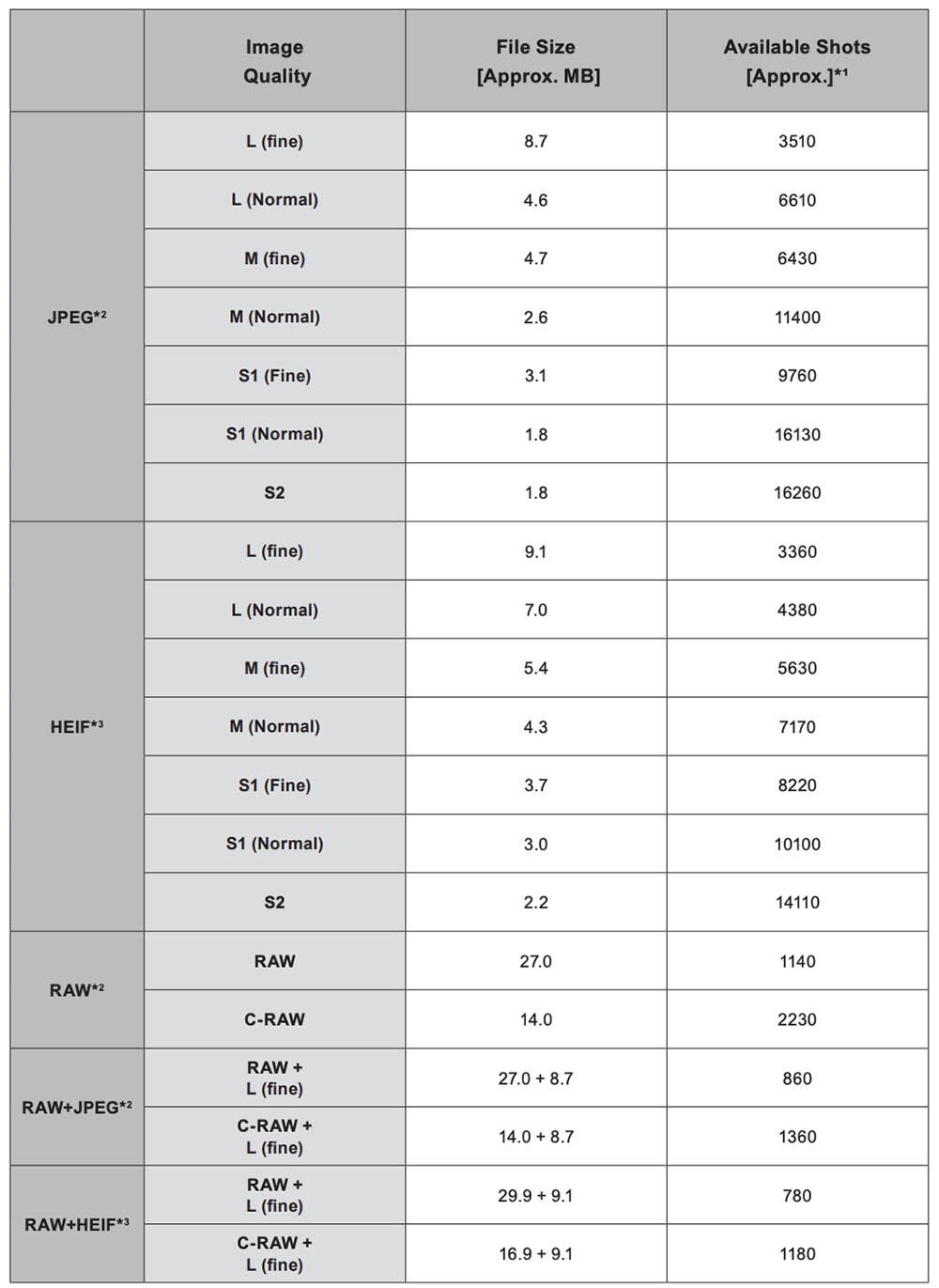
*2: When set to [HDR shooting (HDR PQ): Disable].
*3: When set to [HDR shooting (HDR PQ): Enable].
* File sizes are determined based on Canon testing standards.
* File size varies by shooting conditions (such as aspect ratio, subject, ISO speed, Picture Style, and Custom Function
Memory Cards for Recording Video
In the table below you will find Canon’s list of memory card performance requirements for shooting video with the R50.
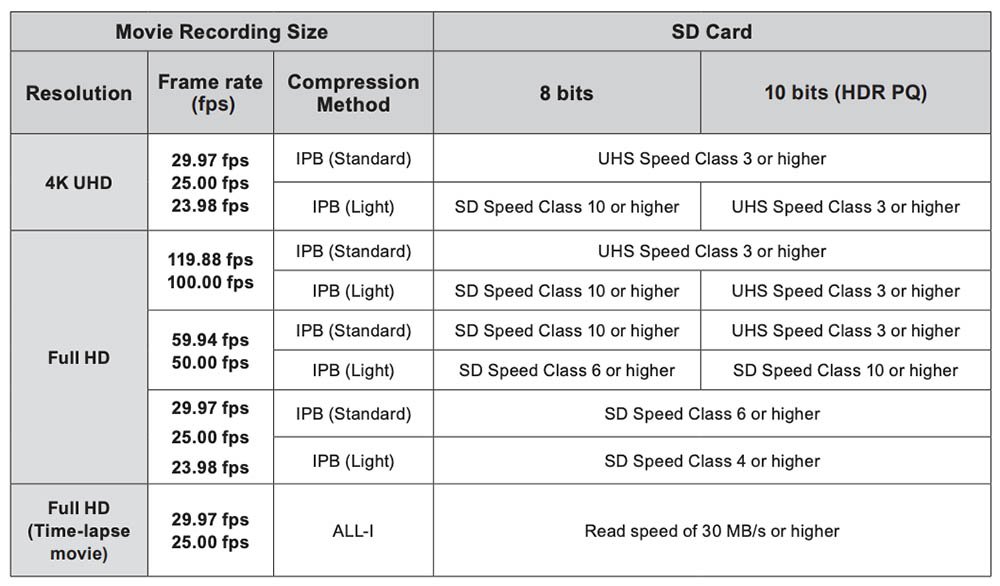
If you look at the table you’ll see that none of the R50’s video modes require an SD card that is rated faster than UHS Speed Class 3 / V30. This means that the card should be able to sustain a minimum write speed of 30 MB/s.
We would recommend one of the following memory cards all of which are UHS Speed Class 3 / V30.
| Memory Card | Price Check |
|---|---|
| Delkin Devices Advantage UHS-I | B&H Photo | Amazon |
| Kingston Canvas Go Plus UHS-I | B&H Photo | Amazon |
| SanDisk Extreme Pro UHS-I | B&H Photo | Amazon |
Whichever card you buy please make sure that it is 64GB or larger in capacity, since these will be SDXC cards. 32GB and lower capacity cards will be labelled SDHC and they use the FAT32 file system. Movies recorded on SDHC cards will be split into 4GB chunks which makes for more work in post.
Movie Recording Times
How long you can record for will vary greatly depending on the file format that you are recording in and the size of the memory card being used.
Here are the estimated recording times for the EOS R50 depending on your movie settings and memory card size.
HDR PQ : Off
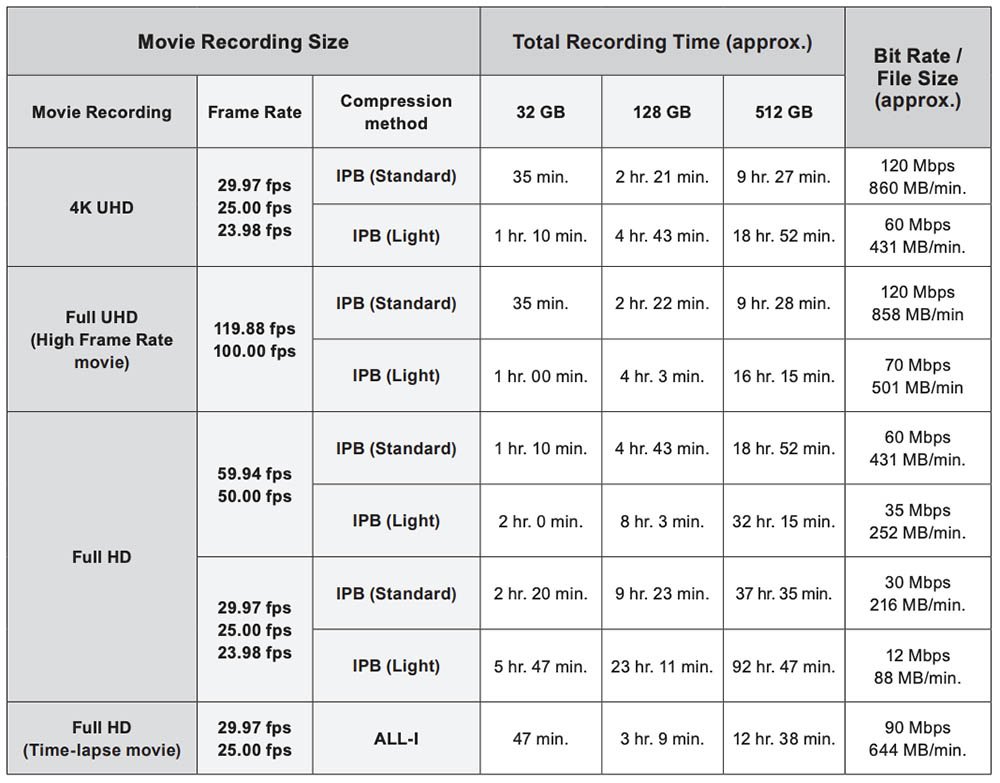
* Movie recording stops when the maximum recording time per movie is reached.
* Sound is not recorded for approx. the last two frames when the compression method for movie recording quality is IPB (Standard) or IPB (Light). Moreover, the video and sound may be slightly out of sync when movies are played back in Windows.
HDR PQ : On
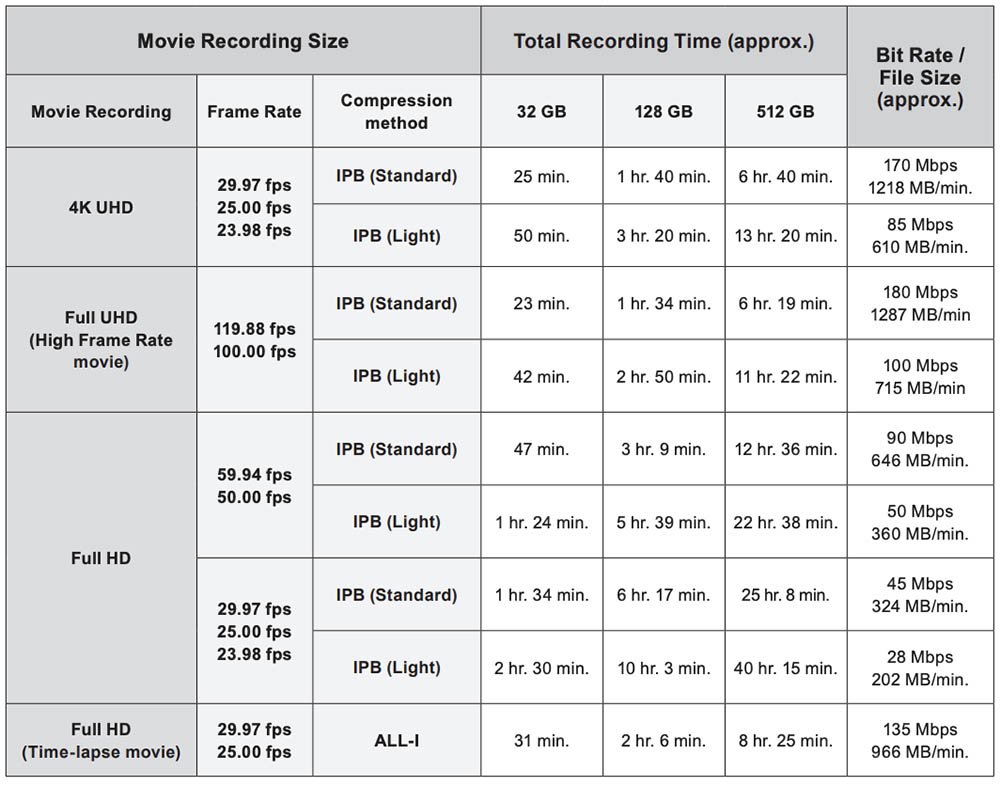
* Movie recording stops when the maximum recording time per movie is reached.
* Sound is not recorded for approx. the last two frames when the compression method for movie recording quality is IPB (Standard) or IPB (Light). Moreover, the video and sound may be slightly out of sync when movies are played back in Windows.
Memory Card Readers
A lot of the time mixing different memory card and reader brands works fine, but occasionally compatibility problems can arise.
We therefore strongly recommend matching your card reader to your memory cards to minimize any compatibility issues.
The maximum transfer speeds will always be limited by either the reader or the maximum cards speeds. So don’t be tricked into buying a reader that advertises faster transfer speeds than the cards it supports.
| UHS-II SD Card Reader | * Max Transfer Speed | Price Check |
|---|---|---|
| Lexar Professional Workflow Dual-Slot | 312 MB/s | B&H Photo | Amazon |
| SanDisk Extreme Pro SD Card USB Type-C | 312 MB/s | B&H Photo | Amazon |
| Kingston Mobilelite Plus | 312 MB/s | B&H Photo | Amazon |
| Sony MRW-S1 UHS-II SD Memory Card Reader | 312 MB/s | B&H Photo | Amazon |
Summary
With the Canon EOS R50 supporting the slower UHS-I SD cards, you thankfully won’t need to invest in the more expensive UHS-II cards.
The fastest UHS-I card that we tested in the R7 cleared the buffer in 16.5 seconds vs 21 seconds for the slowest tested.
If you are shooting continuous bursts often then we would recommend going with one of the faster memory cards from our R7 tests.
If you don’t shoot continuous bursts then we would simply recommend picking whichever card is cheapest at the time of purcase.
Hopefully we will get chance to test our cards in the R50 soon so that we can update this guide with actual figures from the R50.
FAQs
SDHC cards use the FAT32 file system and can store up to 32 GB of data, while SDXC cards use the exFAT file system and can store up to 2 terabytes (2000 GB).
One.
SD/SDHC/SDXC UHS-I memory cards.

Leave a Reply