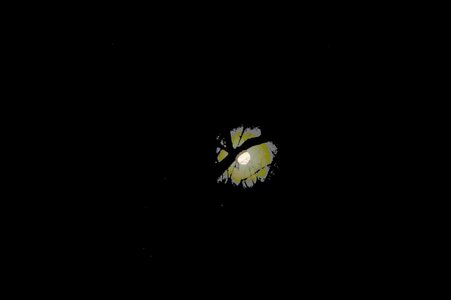
What happened with this?

Welcome to our Canon RF Shooters Forum

Be apart of something great, join today!

JackC

Well Known Member
Pro Member
Pro Member
Joined
Jul 5, 2022
Posts
188
Solutions
1
Likes Received
401
Points
63
Name
Jack
City/State
Calgary, Alberta
CC Welcome
  1. Yes
I was messing around with R7 and RF 18-150 trying to get a shot of the moon this morning. I was using AEB, 3 shots (-1,0 +1). I put the three into DPP 4 and used Composite tool to merge them together. The single shots do not have the green circle but merged image does. Anyone know why this happened and what I can do to stop it? AEB attempt 4.jpeg
  • Join to view EXIF data.
 
Looked and thought about it a few times. Nor sure what DPP did there. Do you have the latest version? Can you reset the preferences or maybe re-install DPP?
 
I keep it updated and just use it to pre-cull files using Quick-Check. I have not messed around with it for developing for years. Do you use other software that will do that job? Also I think there are 3rd party apps.
 
I keep it updated and just use it to pre-cull files using Quick-Check. I have not messed around with it for developing for years. Do you use other software that will do that job? Also I think there are 3rd party apps.
I only use Photos with my iMac and once a year or so I try DPP-with very little satisfaction.
 
I only use Photos with my iMac and once a year or so I try DPP-with very little satisfaction.
I can't remember the last time DPP had a major update. About 15 years ago when they added Digital Lens Optimizer? :rolleyes:

I do like using the Quick Check - Full screen mode for culling. It shows the files as finished Jpegs based on some of the settings in your camera. So contrasty and sharp. Also DPP's fit to screen algorithms are really good. Its not for everyone but it really helps me fine tune before importing into my developer. And its free.

1. Edit - Select All files
2. Quick Check - Full Screen
3. Use < and > keys to scroll
4. Press X to select unwanted files
5. Press 0 (zero) to un-select a file
6. When done press Escape button.
7. Exit Quick check (u-turn icon upper left hand corner)
8. Edit - Rating - Select Rejected Images Only
9. File - Move to trash
 

Latest reviews

  • Canon EOS R50
    5.00 star(s)
    Excellent Beginner's Camera, and a Very Good Enthusiasts Camera
    The R50 is a fine entry level/beginner/casual stills camera. It is not a pro level camera, but would be fine for hiking, street, family photos...
    • SwampGrizz
  • Canon EOS R6
    5.00 star(s)
    A nice camera specially if you want to save some money
    I bought the Canon R6 in 2024 to replace my Canon R7. After researching the market, I decided to go with the R6 instead of the R6 Mark II. Why not...
    • ctitanic
  • Prime Canon RF 50mm F1.2L USM
    5.00 star(s)
    Long Story Short Review
    10 years ago.....yes I said it was a long story! Canon sent me an EF 50mm f1.2 for a lens evaluation. On my 5D Mark III it was rather amazing. A...
    • GaryM
Back
Top