Canon R5 II Lack of in camera GPS

Welcome to our Canon RF Shooters Forum

Be apart of something great, join today!

Senojbor

Newcomer
Joined
Mar 27, 2026
Posts
6
Solutions
1
Likes Received
7
Points
3
Name
Rob Jones
I travel quite a bit and I find it disappointing that there is no inbuilt GPS without having to connect via the Canon connect app.
Most smartphones have GPS so just why they don't include it is anyone's guess.
It requires the phone to be on which I don't want to do because some of the remote treks I do I cannot recharge the phone.
Of course some older cell phones don't have GPS anyway
I raised this point to them at the photography show at the NEC. The said they would relay the feedback
 
Solution
Guy's some of that is beyond me :) but thanks
Anyway, I've just been out and about to a few local locations, kept the app open on my phone and it seems to have geotagged the images accurately.
Camera reconnects after switching on and off, so must remember to open the app!
Not only that; Canon has discontinued the GP-E2. Canon Connect leaves a lot to be desired and appears to be a band-aid dor the issue.
I use an iOS app, MyGPSLog to keep a track that I download as a .gpx file and then use exiftool to batch update location.
 
Not only that; Canon has discontinued the GP-E2. Canon Connect leaves a lot to be desired and appears to be a band-aid dor the issue.
I use an iOS app, MyGPSLog to keep a track that I download as a .gpx file and then use exiftool to batch update location.
Interesting. How does that work? After an outing you have a mem card with photos, and a log file with GPS data - how do you batch geotag the photos?
 
Basically exiftool compares time/date stamp on photos and match to track points. If no match it will infer.
Example command

exiftool -geotag track.gpx -r directory

See also

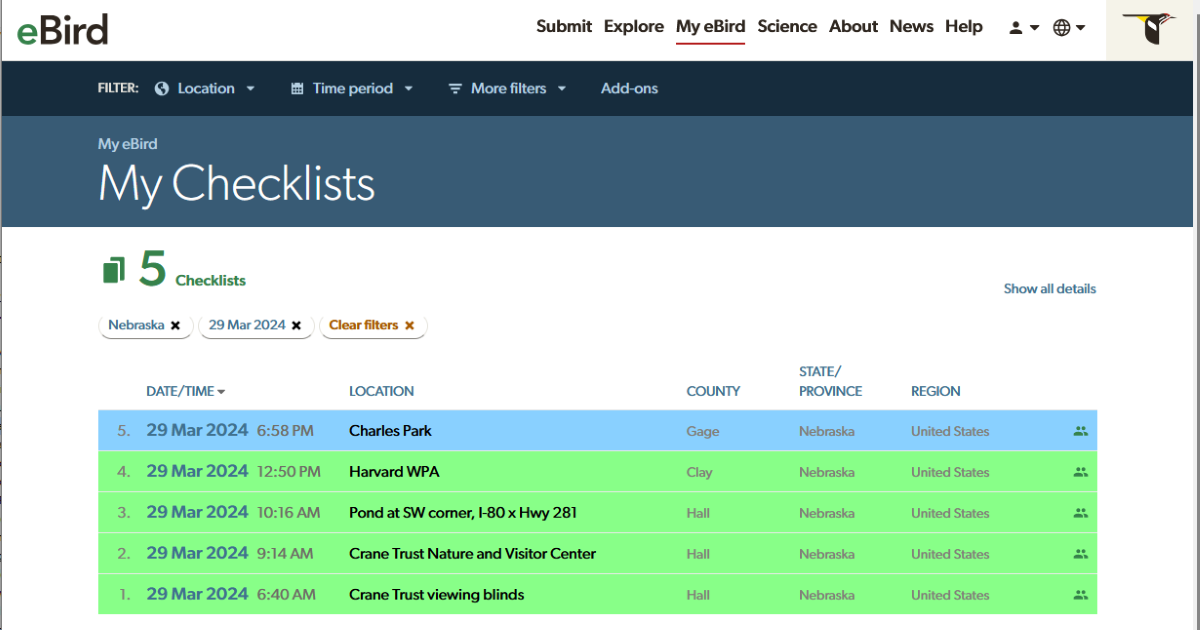
For birders, you may be able to install the eBird Assistant browser extension
To extract a gpx from your tracked eBird checklist and use that as input to exiftool.

I have not tried this yet.
 
Guy's some of that is beyond me :) but thanks
Anyway, I've just been out and about to a few local locations, kept the app open on my phone and it seems to have geotagged the images accurately.
Camera reconnects after switching on and off, so must remember to open the app!
 
Solution
Basically exiftool compares time/date stamp on photos and match to track points. If no match it will infer.
Example command

exiftool -geotag track.gpx -r directory

See also
Man, there is some dense prose in that exiftool website. So does exiftool write to .CR3 files? Not sure I would want anything to sully my raw files.
 
My later DSLRs had built-in GPS receivers that just worked, every time. All the images made with my 5Div have geotags.

When Canon moved to mirrorless, they were so freaked out about battery life that they stopped putting the GPS receivers in everything. I now use Canon Connect and that works about half the time. Sometimes it's my fault for not getting it paired up correctly, sometimes I think it's working but stopped in the middle of the day, sometimes I forget to check and it just never paired up. Heck, my time stamps on different bodies no longer sync up because I let the GPS set the clocks. CanCon is the worst GPS image-tagging app out there, except for all the others.

It's bad enough now that I'm surprised when it does work. Oh look, I got coordinates with these shots. Yippee.
 
For birders, you may be able to install the eBird Assistant browser extension
To extract a gpx from your tracked eBird checklist and use that as input to exiftool.

I have not tried this yet.
OK. I attempted to use this method today. However, the .GPX files does not include timestamp info in the trackpoint data and this is required by exiftool. However, I did checkout the available GPX and KML files.
1. Only the KML file open in Google Earth
2. Both file types open in an online viewer (e.g. ViewGPX

UPDATE: I also tried to use the generated GPX file in LrCMap module. It also failed to match any images due to lack of timestamp data.
 
Last edited:
My later DSLRs had built-in GPS receivers that just worked, every time. All the images made with my 5Div have geotags.

When Canon moved to mirrorless, they were so freaked out about battery life that they stopped putting the GPS receivers in everything. I now use Canon Connect and that works about half the time. Sometimes it's my fault for not getting it paired up correctly, sometimes I think it's working but stopped in the middle of the day, sometimes I forget to check and it just never paired up. Heck, my time stamps on different bodies no longer sync up because I let the GPS set the clocks. CanCon is the worst GPS image-tagging app out there, except for all the others.

It's bad enough now that I'm surprised when it does work. Oh look, I got coordinates with these shots. Yippee.
Yep, you are right. I bought the early releases of their mirrorless cameras and soon sold them, too small, battery life etc.
It's not had to see why others such as Sony, Nikon Olympus, Fuji and others took advantage. All produce excellent mirrorless products.
Absolutely no reason not to include GPS these days
 
My later DSLRs had built-in GPS receivers that just worked, every time. All the images made with my 5Div have geotags.

When Canon moved to mirrorless, they were so freaked out about battery life that they stopped putting the GPS receivers in everything. I now use Canon Connect and that works about half the time. Sometimes it's my fault for not getting it paired up correctly, sometimes I think it's working but stopped in the middle of the day, sometimes I forget to check and it just never paired up. Heck, my time stamps on different bodies no longer sync up because I let the GPS set the clocks. CanCon is the worst GPS image-tagging app out there, except for all the others.

It's bad enough now that I'm surprised when it does work. Oh look, I got coordinates with these shots. Yippee.
That's not strictly true; although the cheaper mirrorless models don't have GPS, the R3 certainly does - not sure about the R1. As my R3 is only really used for concert photography, I've never used its GPS. By contrast, my R5 gets to travel around a lot, so GPS would be really handy. Fortunately, I still have my GP-E2 from my 5D3 days, and as it works perfectly with the R5 I haven't had to resort to software solutions.

Hopefully, in the future, Canon will rethink their GPS strategy...
 

Latest reviews

  • Canon EOS R6
    5.00 star(s)
    A nice camera specially if you want to save some money
    I bought the Canon R6 in 2024 to replace my Canon R7. After researching the market, I decided to go with the R6 instead of the R6 Mark II. Why not...
    • ctitanic
  • Prime Canon RF 50mm F1.2L USM
    5.00 star(s)
    Long Story Short Review
    10 years ago.....yes I said it was a long story! Canon sent me an EF 50mm f1.2 for a lens evaluation. On my 5D Mark III it was rather amazing. A...
    • GaryM
  • Zoom Canon RF 70-200mm F2.8L IS USM
    5.00 star(s)
    Fast, sharp, and lightweight! A great lens
    This is my main workhorse of a lens and I love it. It's very light weight (only around 2.3 lbs) lens. I've been able to hand-hold it for an event...
    • Crysania

New in the marketplace

Back
Top